
An AI factory on one desk: Isaac Sim on Kubernetes on a DGX Spark
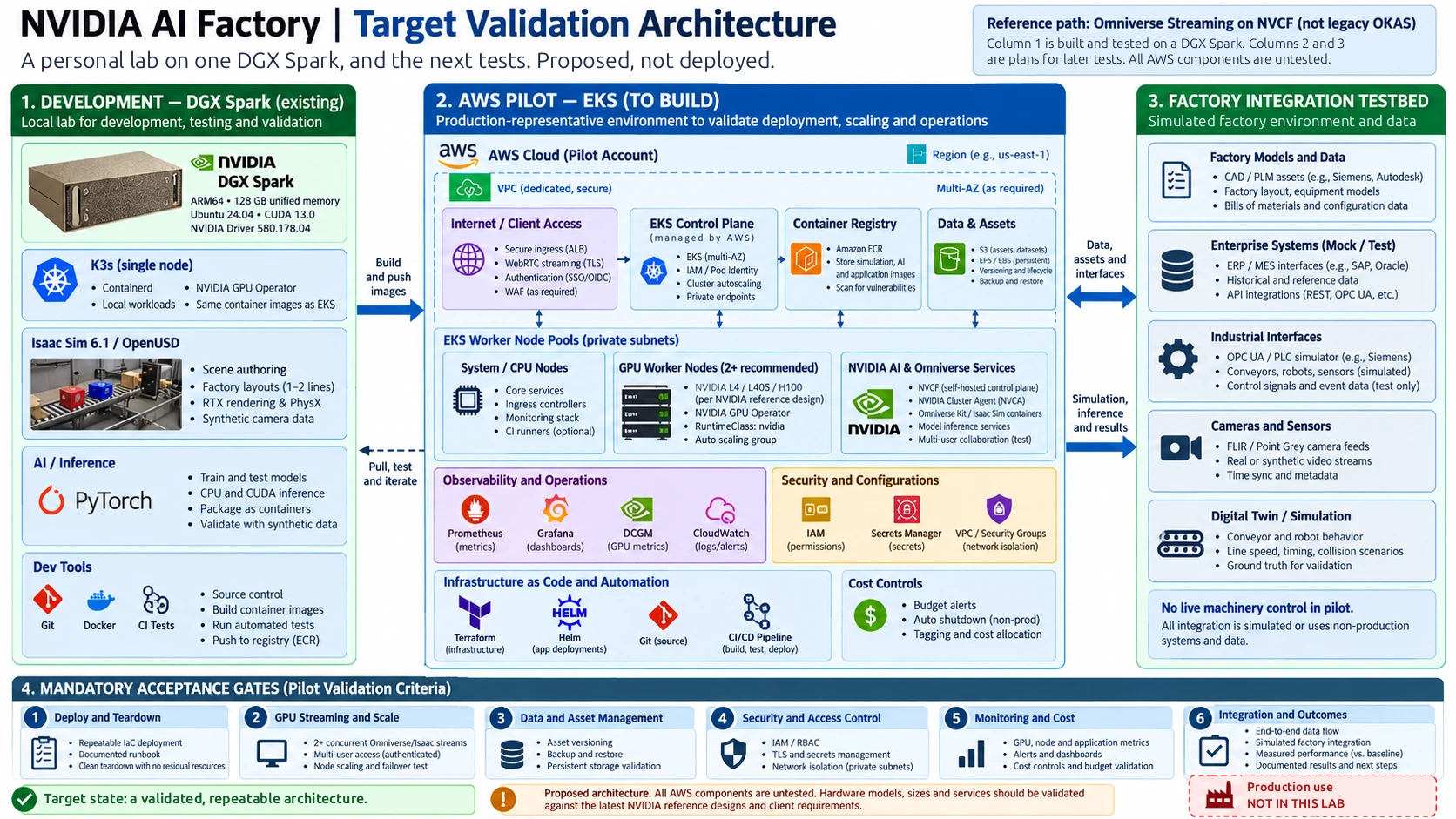
A personal test of NVIDIA's AI factory building blocks at desk scale: a single-node Kubernetes cluster, the GPU Operator, Isaac Sim rendering an animated OpenUSD factory, a camera-to-classifier loop, remote viewing and scene recovery. What worked, what broke, and what it does not prove.
Key takeaways
- The whole stack fits on one DGX Spark: K3s, the GPU Operator, Isaac Sim and a small inference loop.
- A scene is saved only by an explicit OpenUSD export that a check confirms. The viewer buttons save nothing.
- Give the GPU to one workload at a time. The one hard hang came while the GPU was shared.
- A perfect score on a small synthetic image set proves the plumbing, not the model.
I wanted to know how much of NVIDIA's AI factory stack (GPU scheduling, simulation, synthetic camera data and inference) I could stand up and test on one desk. Over two days, 7 and 8 October 2026, I built a small lab on an NVIDIA DGX Spark. It is a personal test, not a production system.
The setup
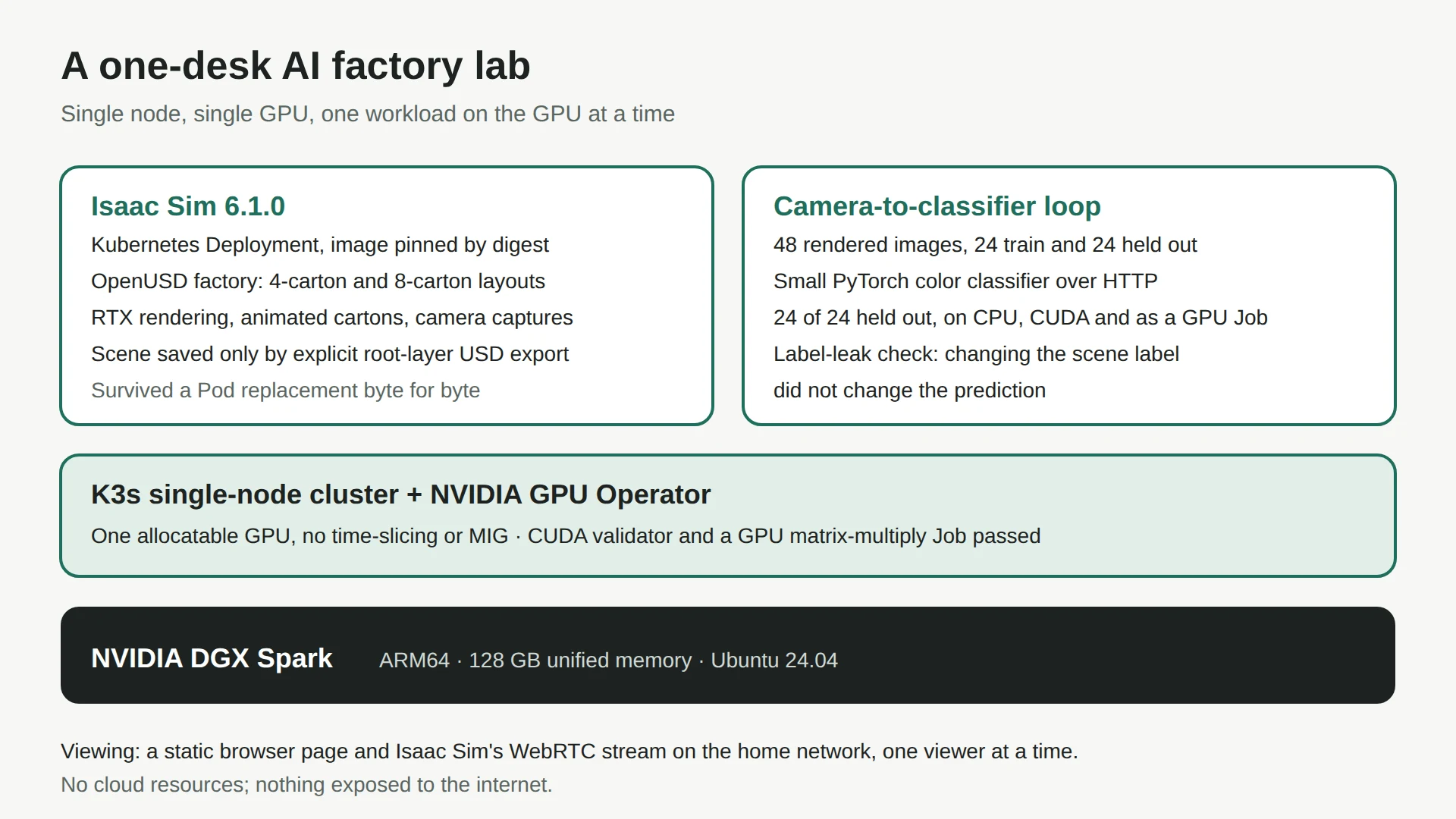
| Part | What I used |
|---|---|
| Machine | One NVIDIA DGX Spark: ARM64, 128 GB of unified memory, Ubuntu 24.04 |
| Cluster | A single-node K3s cluster (v1.36.5) with the NVIDIA GPU Operator (v26.7.1), using the host's driver and container toolkit |
| GPU | One allocatable GPU, requested through the nvidia RuntimeClass. No time-slicing and no MIG, so GPU work runs one job at a time |
| Simulation | NVIDIA Isaac Sim 6.1.0 as a Kubernetes Deployment, container image pinned by digest |
| Scene | An animated OpenUSD factory: a one-lane, four-carton layout and a two-lane, eight-carton expansion |
| Viewing | A static browser page and Isaac Sim's WebRTC stream on my home network |
| Cost | No cloud resources, and $0 cloud spend |
What I built and checked
GPU scheduling
- The NVIDIA CUDA validator passed.
- A Kubernetes Job ran a float32 matrix multiplication on the GPU, with zero maximum error against the reference.
- A separate CPU Pod resolved cluster DNS and made a certificate-checked TLS connection to the API.
- I captured CPU metrics and 11 GPU metric readings from DCGM. There is no dashboard or alerting.
The factory scene
- Both layouts passed geometry and camera checks and rendered at 800 by 600 through RTX.
- A small panel in the stream switches between one and two lanes and plays or pauses the carton motion.
- A separate CPU PhysX test dropped a cube for 180 steps over 3 seconds and recorded 24 contacts.
- The animation is visual. It does not measure machine speed, line capacity, conveyor dynamics or throughput.
From simulated camera to classifier
- I rendered 48 images from the factory camera: 24 for training and 24 held out, each split balanced between red and blue cartons, with no file in both splits.
- The first capture came out black. The camera's near clipping plane was cutting the scene, and I redid the capture after fixing it.
- A small PyTorch color classifier, served over HTTP, got 24 of 24 held-out images right on both CPU and CUDA. It also handled seven invalid inputs.
- To check it was not reading the answer from the scene, I changed the expected class in the USD file and kept the same image. The prediction did not change.
- As a GPU Job on the cluster it also scored 24 of 24, and the largest CPU-versus-CUDA difference in its outputs was 4.7684e-7.
That score proves the plumbing, not the model. It learns color from the average color of each image, the set is tiny, and the training and test images are different views of the same generated objects. That is the kind of split leakage Kapoor and Narayanan catalogue [1]. It is not evidence of real defect detection.
Remote viewing
- Isaac Sim streams over WebRTC to a static browser page. Viewing and play and pause from a Mac on the home network worked.
- Only one viewer can connect at a time.
- Changing the layout and reconnecting from the Mac were not formally checked.
- The stream was ready less than a minute after scaling the Deployment up, and repeated stop and start cycles were clean.
- There is no login. It is a trusted home-network demo, and nothing is exposed to the internet.
Saving and recovering a scene
- The viewer's buttons change the live session only. They save nothing.
- A scene is kept by exporting its root layer to OpenUSD with a dedicated step, followed by a check against the saved file.
- To test recovery, I exported an eight-carton scene from one Pod and replaced the Pod. The new Pod loaded identical bytes, kept both layouts, and rendered eight cartons after the browser reconnected.
- What is not saved: the undo history, interface state, the animation time and any running simulation.
- The scene lives on the machine's own disk. It survives a Pod replacement, not the loss of the machine.
Problems I hit
| What happened | What I did |
|---|---|
| The display driver hung and the machine needed a hard reset. Isaac Sim was sharing the GPU with three other workloads at the time | Restarted it alone on the GPU. It ran for about 15 minutes with no driver errors in the kernel log. The cause is unproven and sharing is only the suspect; settling it needs the kind of GPU concurrency testing in [2]. Fifteen minutes is a short window |
| The first camera captures were black | Fixed the camera's near clipping plane and recaptured |
| Re-applying the original Deployment file would reset the scene to the original layout | Start and stop by scaling the existing Deployment between 0 and 1 instead |
| A systemd daemon reload once cut GPU access for Docker containers on the same machine | Don't reload system services or rerun the K3s installer while GPU work is running |
| K3s and the viewer do not start on boot | After a reboot, check that the node and GPU are ready before scaling Isaac Sim up |
How to run it
- Check that nothing else is using the GPU, and note the count of NVRM driver messages in the kernel log.
- Start K3s if needed, and wait until the node and GPU report ready.
- Start the viewer page.
- Scale the Isaac Sim Deployment to 1. Kit loads in 30 seconds to a minute, then the scene loader opens the saved scene and adds the control panel.
- Check that the Pod is running, that the loader logged its start, and that the NVRM count has not grown.
- Open the viewer in Chrome or Edge, with no other viewer connected.
- To stop, scale to 0, wait for the Pod to go, stop the viewer, and confirm the streaming ports are closed and the GPU is free.
If I move it to a cloud GPU
My next test is the same scene on a single cloud GPU instance. None of this has been built yet. These are the notes I would start from:
- Isaac Sim needs an RTX GPU, one with ray-tracing cores. My notes list the AWS G6, G6e, G7 and G7e families as RTX-capable. The P-series training instances (A100, H100, B200, B300) have no ray-tracing cores.
- The default GPU vCPU quota is small and often blocks the first launch, so request it on day one.
- Those instances are x86, while the lab is ARM64, so the image has to be pulled, checked and pinned again. The lab's pin does not carry over.
- A remote-desktop service such as Amazon NICE DCV would take the WebRTC page's role, reached through Systems Manager so the instance has no open inbound ports.
- Build it with Terraform, with a spending cap that expires and a tested teardown from the first day.
Related research
Three published papers that support or bear on claims in this write-up. Each link was checked on 23 October 2026.
- Supports the classifier caveat [1]. My claim: the training and test images are different views of the same generated objects, so a perfect score says nothing about real defect detection. Kapoor and Narayanan sort leakage by source, including duplicates from the same generator, which is exactly this split problem.
- Bears on the GPU hang [2]. My claim: the hard reset happened while four workloads shared one GPU with no time-slicing or MIG, and the cause is unproven. Gilman and Walls measure how concurrent work on one NVIDIA GPU interferes, which is the kind of evidence that would settle it.
- Bears on the digital-twin question [3]. My claim: the scene is a simulation, not a twin. Wooley, Silva and Bitencourt separate a one-way simulation from a twin fed by live data, and this lab is the first kind.
What this does not prove
- It is not a production AI factory. There is no certified reference design, no high availability, no production storage, and no identity, RBAC, network policy, TLS or secrets management.
- Nothing ran on a cloud provider, and no cloud charges were incurred.
- No multi-GPU, multi-user or scaling behavior was tested.
- There is no link to real machines, CAD, PLM or plant systems. The scene is a simple simulation that is not fed live data, which is a long way from a digital twin [3].
- Nothing here supports a claim about throughput, accuracy or business outcomes.
What it does show: on one desk, I built and checked a GPU Kubernetes environment running Isaac Sim, with rendered factory layouts, a simulated-camera inference loop, remote streaming, and a scene that survives losing its Pod.
Sources
- Leakage and the reproducibility crisis in machine-learning-based science. Patterns 4(9):100804Sayash Kapoor; Arvind Narayanan. (2023). Retrieved 2026-10-23.
- Characterizing concurrency mechanisms for NVIDIA GPUs under deep learning workloads. Performance EvaluationGuin Gilman; Robert J. Walls. (2021). Retrieved 2026-10-23.
- When is a simulation a digital twin? A systematic literature review. Manufacturing LettersAna Wooley; Daniel F. Silva; Julia Bitencourt. (2023). Retrieved 2026-10-23.
Related reading
 Studio · October 28, 2026
Five videos from one MCP: an agent drives the VRGDG Music Video Builder
I gave Claude Code the MCP server that ships with the VRGDG nodes for ComfyUI and let it make the videos itself on one NVIDIA DGX. No one touched the Builder UI. It made rock, country and R&B music videos, a narrated Goldilocks and a cooking show. This entry has all five, what worked, what broke, and the runbooks to do it again.